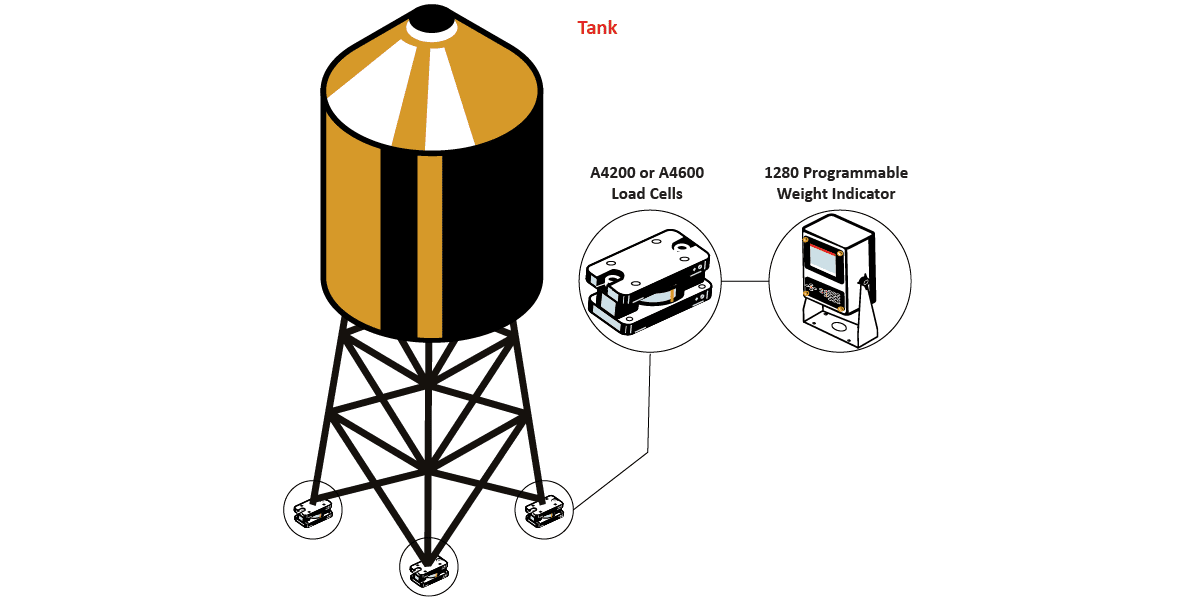
Customer needs to monitor the amount of material in a tank by weight and locate the center of gravity.
Interface Solution
Using Interface’s A4200 Zinc Plated or A4600 Stainless Steel Weigh-check Load Cells, along with Interface Instrumentation, Interface provided a solution that monitors the amount of material by weight in their tank while locating the Center of Gravity.
Results
Tank weights are monitored so refilling, dispensing or emptying takes place safely while monitoring center of gravity.
Materials
A4200 Zinc Plated or Model A4600 Stainless Steel Weigh-check Load Cells
1280 Programmable/Controller
Setup & Scaling of Load Cells and Instrument by Interface
How it Works
Interface’s A4200 or A4600 Weigh-check Load Cell is installed between the support arm of tank and support pedestal of tank. The Weigh-check Load Cell will measure the load as material is loaded into or unloaded out of the tank.
The 1280 Programmable/Controller will use weight measurements and display the weight for each leg and corresponding total weight.
The 1280 Programmable/Controller will use weight measurements in conjunction with programmed formula to calculate the relevant Center of Gravity.